For parents and guardians
See what your student is working on and how it is going, without asking every evening.
Progress, not just hours logged
A parent account has its own short menu: your student's courses and progress, their lesson recordings, family and account settings, tutors and messages.
- Courses and progress. mastery by topic and what your student has been practising
- Email summaries. a daily recap and a weekly summary of your student's SAT work, sent to the parent email on the account
- Lesson recordings. recorded tutor lessons, kept with the course
- Tutors and bookings. find an approved tutor and see upcoming lessons
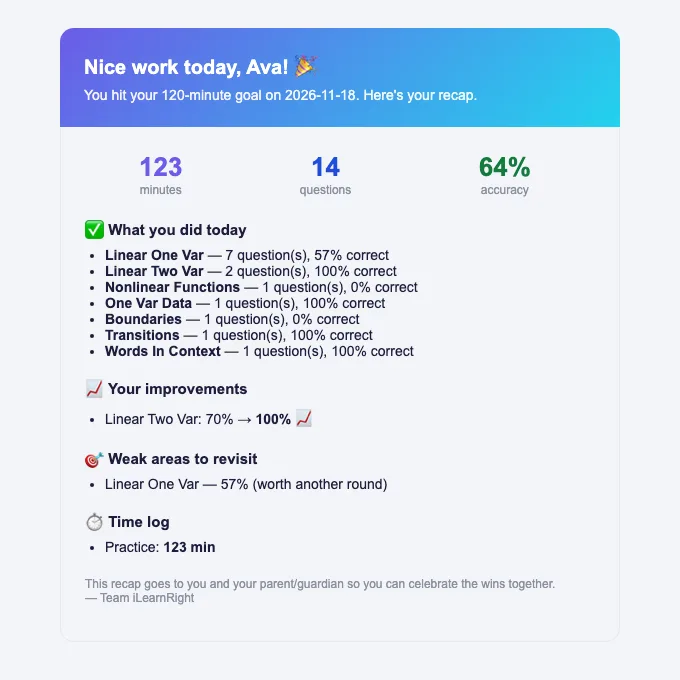
Linked by an emailed confirmation
A student adds a parent or guardian in Settings, or a parent asks to confirm a student who added them. We email the parent a one-time link, and it only works for an account with that email address.
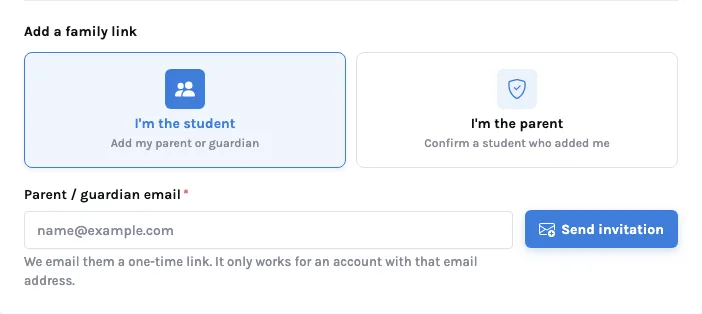
Confirmed by email, removable by either side
A family link is what connects a parent account to a student account.
- 1
Start the link
The student adds a parent's email in Settings, under Family. A parent can also start it for a student who has named them.
- 2
Confirm from your inbox
iLearnRight emails the parent a one-time link. It only works for the person signed in with that email address, and it expires.
- 3
See progress
A confirmed parent can see the student's courses, progress and lesson recordings, and gets the weekly summary.
- 4
Remove it any time
The student or the parent can remove the link in Settings.
Accounts created before family links existed keep working with the parent email the student entered at sign-up. We are asking those parents to confirm by email.
What we do, and what we leave to you
13 and up
Student accounts are for ages 13 and up. Students aged 13 to 17 are marked as minors on their profile.
Tutors are approved, not vetted for you
We review applications and documents. We do not run background checks. Sit in on a first lesson if you want to.
AI is a study aid
Explanations can be wrong. They show their working, and homework help does not hand over answers.
What parents ask
How do I get access to my child's progress?
Your student adds your email in Settings, under Family, or you start it from your own account. iLearnRight emails you a one-time link, and you confirm it while signed in with that email address. Either of you can remove the link later.
My child signed up before family links existed. Do I need to do anything?
The parent email your student entered at sign-up still works for now. We are asking parents to confirm by email, and you can do it from Settings, under Family.
What exactly can I see?
Your student's courses and progress, their lesson recordings, and email summaries of their SAT work (a daily recap and a weekly summary). You do not see their messages.
Can a child under 13 use iLearnRight?
Not with their own account. Student accounts are for ages 13 and up. If a date of birth shows a student is under 13, the account is removed. A parent, guardian or teacher needs to set up access.
Are tutors background-checked?
No. Our team reviews each tutor's application and documents before listing a profile, but iLearnRight does not run an independent background check. Please use your own judgement, as with any tutor.
How do I pay for tutoring?
You pay the tutor directly after each lesson, at the hourly rate on their profile. iLearnRight does not take a card for lessons.
Can I trust the AI?
Treat it as a study aid. AI explanations can be wrong, which is why they show each step, and why a human tutor is available.
Setting up for your child?
Choose “Parent / guardian” when you finish setting up your account. You will need an invitation code.